Get your reMarkable highlights into Readwise
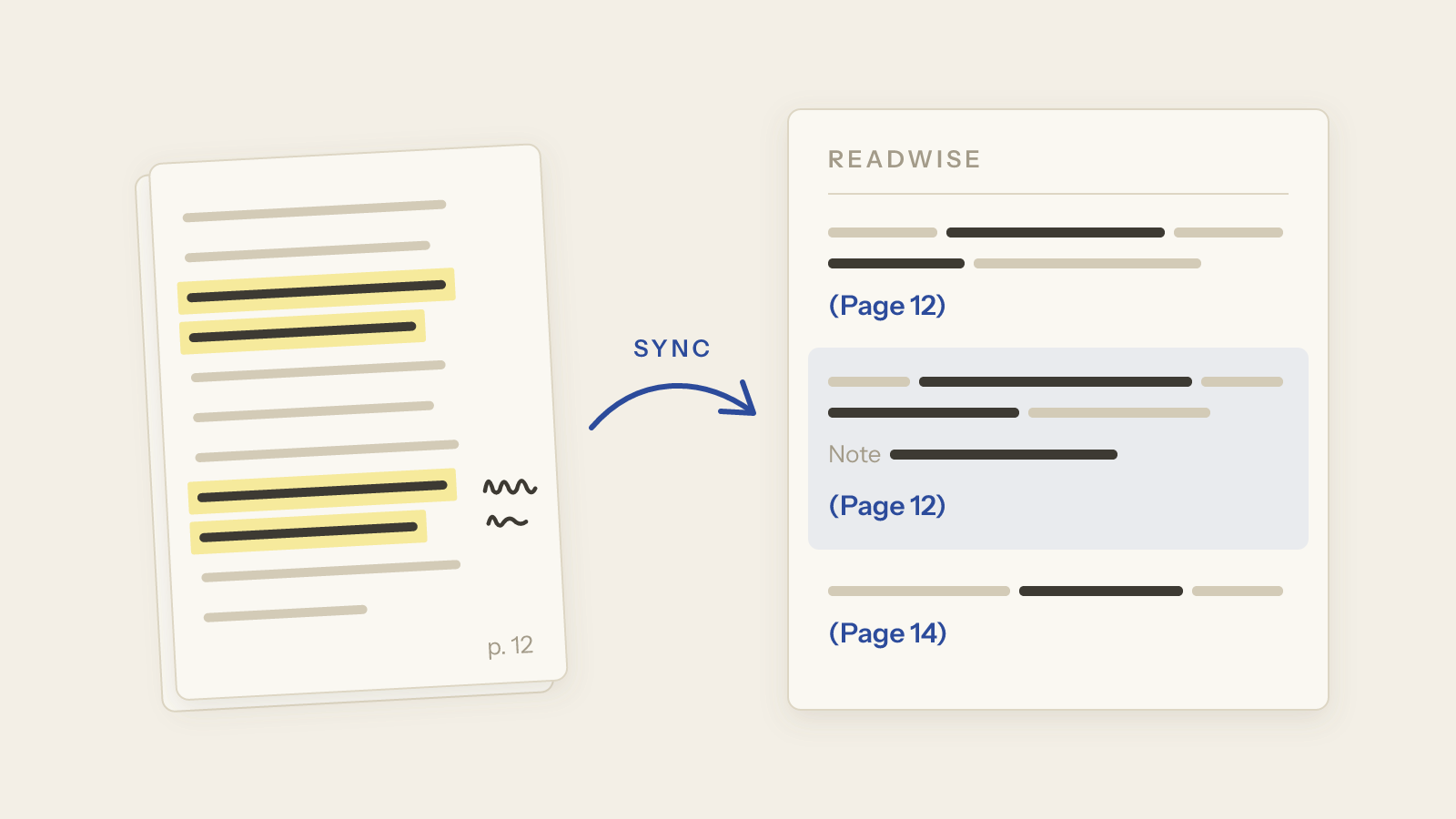
Yes: Tagged Sync pushes the highlights and margin notes of your reMarkable PDFs and EPUBs into Readwise, one way, on every sync. Each document becomes one entry in your Readwise library. Each passage you marked becomes one highlight: the sentence it sits in, with the words you marked in bold, its page number and a link back to that page in Obsidian. Then it comes up in your Daily Review like everything else you read. This doesn’t put Reader articles on your tablet.
I make Tagged Sync, an Obsidian plugin that syncs a reMarkable into a vault, so this is a how-to by the plugin’s maker. Pushing to Readwise is new in version 1.11.0 and part of Tagged Sync Pro, the paid tier. Getting the highlights into Obsidian is free.
In short, it takes three steps:
- Install Tagged Sync from Obsidian’s community plugins, or update it to 1.11.0, and tag the documents you read on your reMarkable.
- Under Settings → Tagged Sync → Readwise, switch on Push highlights to Readwise and paste your Readwise access token. For margin notes, also switch on Your notes on PDFs, which is off by default.
- Sync. When the sync is done, your highlights are in Readwise. The first sync takes longer, see below.
Why Readwise cannot read reMarkable highlights
People have asked for this on Reddit since 2021. One wrote in 2024: “export all highlights from a document as markdown at the very least … or a Readwise integration” (r/RemarkableTablet).
The usual tip is to send the marked-up PDF to Readwise’s PDF import. That finds nothing. Readwise support explained why: “We haven’t had any users successfully import highlights from their Remarkable tablet because the Remarkable tablet only applies color over the highlights which the Readwise parser can’t read” (quoted on r/readwise).
That is true of the PDF the tablet exports. There, a reMarkable highlight is a coloured shape on top of the page, not a highlight in the PDF sense. reMarkable has no Readwise integration of its own, and a few community scripts that did this stopped working in 2022, when the tablet’s file format and reMarkable’s cloud API changed.
Tagged Sync already reads those shapes. It matches each mark to the words under it and takes the words from the PDF’s own text, so no marked word can come out misspelled. Until now, that ended in your vault. With 1.11.0, the same quotes also go to Readwise.
What you need
- A reMarkable: reMarkable 1, reMarkable 2, Paper Pro or Paper Pure.
- Obsidian 1.13.4 or newer on the desktop, with Tagged Sync 1.11.0 or later.
- Tagged Sync Pro. The 14-day trial starts with one click in the plugin settings, with no key and no email.
- A Readwise account on a plan with API access, which is Full or Highlights. Readwise is free for 30 days, then paid; its Lite plan has no API access. Readwise is a separate service with its own subscription, and nothing of it is sold through the plugin.
How do I get reMarkable highlights into Readwise?
- Open Settings → Tagged Sync → Readwise and switch on Push highlights to Readwise.
- Under Readwise access token, pick or create an entry in Obsidian’s keychain and paste your token from readwise.io/access_token.
- Run a sync.
The token stays in the keychain of this computer. It is not in your vault and not synced with it, so add it on each computer that should push. Use the same Readwise account on every computer: if two computers push to two different accounts, both stop, and the settings say so.
The first sync after you switch it on does more work than later ones. It reads every note once more, so your margin notes and the pages you added go to your transcription backend again. With a local model that takes time; with a cloud backend you pay for it once more. Then everything is pushed. After that, each sync sends only what changed.
Connection, at the top of the Readwise page, shows how many books and highlights the plugin has pushed and whether anything is still waiting.
What arrives in Readwise
One document becomes one entry. An EPUB arrives as a book. Anything else, a PDF, a typed document or an article you sent with Read on reMarkable, arrives as an article.
The title and author come from Zotero when the note knows its Zotero item. Otherwise they come from the EPUB itself. Otherwise the title is the document’s name on the tablet, and there is no author.
Every passage you marked is one highlight: the sentence it sits in, with the words you marked in bold, and its page number. A margin note at a passage becomes that highlight’s note. A margin note on its own, and a page you added on the tablet, become highlights of their own. The typed pages of a notebook go too. Margin notes and pages you added need Your notes on PDFs switched on, like in the vault. That switch is off by default.
In Readwise, (Page 12) next to a highlight is a link. Click it, and Obsidian opens the PDF in your vault at that page. It works from the Readwise app on your phone too, as long as the vault and its PDFs are on the phone. The other way round, the command Open in Readwise opens the book of the note you are in.
Each link is fixed when the highlight is first pushed, because Readwise recognises a highlight by it. If you later add a page in front of a highlight, its link opens a page too early. If you rename the vault, the links already in Readwise stop working. Renaming or moving a note changes nothing.
When something changes
The tablet wins. Change a mark on the tablet, and the highlight in Readwise changes with it. Erase it, and it is deleted in Readwise, also if you edited it there. One exception: if you edited the note in Obsidian by hand, the sync leaves that note alone, so its changes no longer reach Readwise either.
An edit you make in Readwise stays until the same highlight changes on your tablet, or until the plugin reads its margin note again and reads it differently. A highlight you discard in Readwise stays discarded. If you rename a book, change its author or move it to another category, your choice stays. A sync may show the document’s own title for a moment before it puts yours back.
A book you delete in Readwise stays deleted. The plugin never sends it again by itself. If you deleted one by mistake, sync once so the plugin notices, then open its note and run Push to Readwise again. The command is there while the push is on and Pro is active. It starts a sync, reads that document’s margin notes once more and pushes the document as a new book.
Switching the push off, removing the token or a lapsed licence only stops the pushing. Nothing is deleted in Readwise. When you switch it on again, the plugin catches up on what changed in between. After switching off or a lapsed licence, that costs as much as the first sync: every note is read once more. Removing only the token costs nothing extra.
Your notes never wait for Readwise. The push runs after the sync. If Readwise cannot be reached, the next sync tries again.
If you also use Readwise’s Obsidian plugin
Readwise has its own Obsidian plugin that exports your Readwise library into your vault. It also exports these books, one file per book, each highlight linking to its page in the PDF. You don’t need that copy: the notes are already there.
To keep them out, turn on Select Items to be Exported in Readwise and uncheck each Tagged Sync book. Every new book arrives checked, so each new document has to be unchecked by hand.
What it does not do
- Handwritten notebook pages are not pushed. Their transcript stays in your vault.
- Colours and tags do not travel, and Readwise does not learn when you made a mark.
- It is one way. Nothing from Readwise comes back into the note, and nothing goes onto the tablet.
- It does not attach your highlights to a document in Readwise Reader.
- Readwise’s Highlight Quality Filter, which is on by default, can hide a very short highlight from the Daily Review, for example a one-line margin note. The highlight itself stays.
- A mark you make later, above marks already sent on the same page, shows last on that page in Readwise.
What leaves your machine
Only text. The plugin sends the sentences you marked, the text of typed pages, the transcribed text of your margin notes and of pages you added, page numbers, the title and author, and the link back to the page. The link carries your vault’s name and the reMarkable document’s id, not the document’s name or any folder. Nothing sent to Readwise contains your handwriting or a page image.
It goes to readwise.io, into your own library, with your own token. There is no server of mine in
between. Readwise’s terms apply to what you send there. One of them: a passage you highlight may
count toward the popular highlights Readwise shows other readers of the same book, without your
name or your notes.
The details are in the Readwise section of the README and in the FAQ.
Install Tagged Sync from Obsidian’s community plugins, or see taggedsync.com for details. Do you read on the tablet and review in Readwise, or the other way round? Tell me by mail.
Tagged Sync isn’t affiliated with Readwise.