Obsidian plugin for reMarkable
Your handwriting never leaves your machine.
Tagged Sync is an Obsidian plugin for reMarkable tablets. Tag a notebook, a PDF or a book on your reMarkable and it arrives in Obsidian — the page as you drew it, a searchable transcript underneath. Transcribed locally. €24 once.
Desktop only — Obsidian for Mac, Windows or Linux. Doesn't open? See it on obsidian.md, or in Obsidian: Settings → Community plugins → search Tagged Sync.
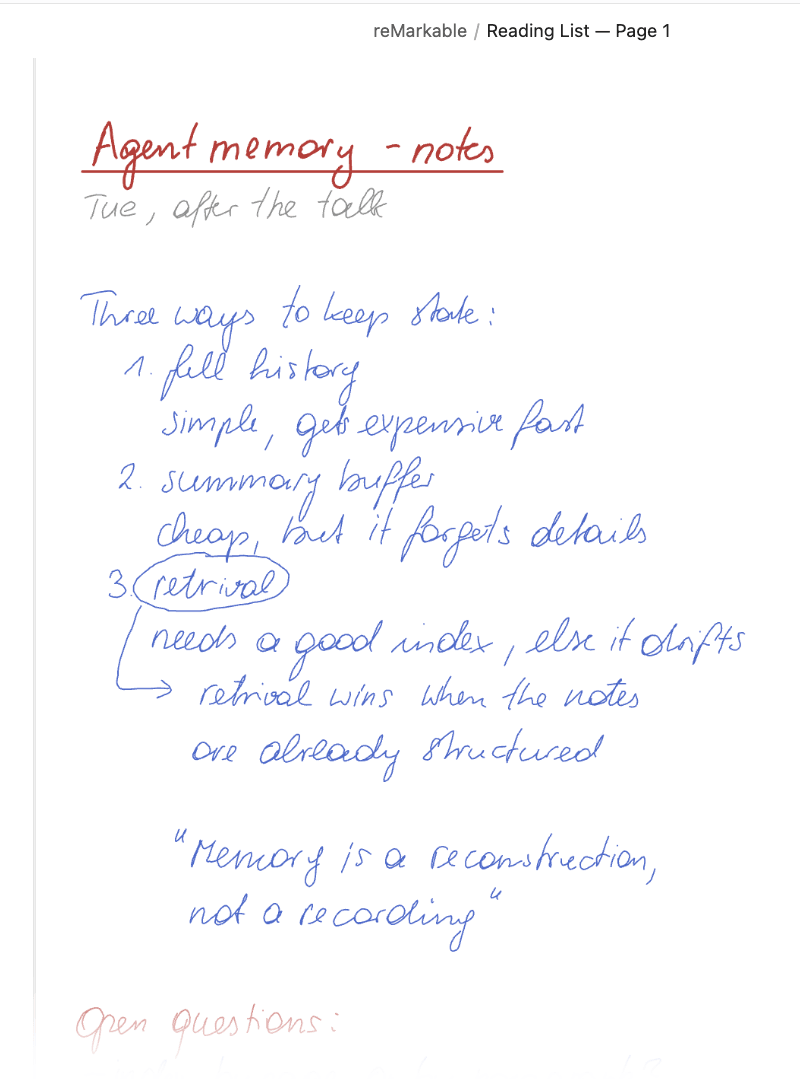
Transcript
Agent memory - notes
Tue, after the talk
Three ways to keep state:
- full history simple, gets expensive fast
- summary buffer cheap, but it forgets details
-
retrieval needs a good index, else it drifts
-> retrieval wins when the notes are already structured
"Memory is a reconstruction, not a recording"
Open questions:
- index by page or by paragraph?
- who decides what to forget?
- can the user see memory?
Todo's
- re-read chapter 4
- sketch the index layout
- ask M. for the slides
What leaves your machine
Nothing.
| Your handwriting | Rendered and transcribed on your computer. No upload, no account with us. |
|---|---|
| Your notes | Tablet → vault, one way. They live in your files, like every Obsidian note. |
| The exceptions | Cloud transcription — off by default, your own key, Pro. The €24 checkout runs on Polar's page, not ours. |
Fig. 1 — the same three lines
Your handwriting, still yours — and now searchable.
Drag the slider to move between the page you wrote and the transcript that lands under it.
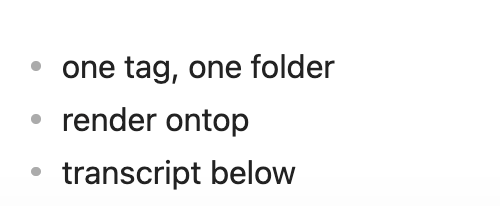
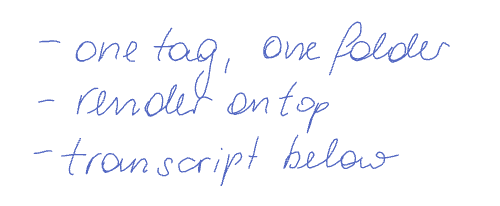
Real output, not a mock-up. The transcript reads “render ontop” where the page says “render on top”. Handwriting recognition misses things, and we would rather show you where.
Transcription
Transcription that stays on your machine.
Cloud transcription exists in Pro, with your own API key, and only if you switch it on. It is the exception, not the default.
What you get either way
The page as you drew it, embedded in the note, plus a transcript split by page so a long notebook stays navigable. Typed text from a Type Folio is taken exactly as you typed it and never sent through transcription.
- macOS
- No setup at all — Apple's own text recognition does the work.
- Apple silicon, Windows on Arm
- A managed local model the plugin installs in a click with checked hashes, if the machine has the memory for it.
- Windows, Linux
- You point the plugin at a local server you run yourself — Ollama, LM Studio, anything OpenAI-compatible.
One tag decides what syncs, and where it lands.
The whole plugin is one idea: it copies the notebooks, PDFs and books you tag into your vault, embeds each page as you drew it, and transcribes the handwriting on your own machine.
-
Tag it on the tablet
Tag a notebook, a PDF, a book, a single page or a whole folder on your reMarkable — say
sync. -
Map the tag to a vault folder
Map that tag to a folder in your vault. A tagged folder hands its tag to everything inside it.
-
Sync
Sync — on launch, on an interval, or when you say so. Only what you tagged is touched.
Fig. 2 — start to finish
Fig. 3 — a marked-up paper
Every passage you highlighted, quoted in your vault.
Highlights and pen marks — underline, circle — come across as quotes with the sentence around them, grouped under the section they came from. Each quote carries a block ID, so a single passage can be linked from anywhere in your vault.
A book you read as an EPUB works the same way. The tablet turns it into a PDF to read it, and the plugin reads that same one — so a passage you swiped the marker across arrives as the quote it is, under the chapter it sits in, named the way the book's own table of contents names it.
None of this goes through transcription, so it works the same on Windows and Linux as it does on a Mac.
What it does not do.
Everything below is a real limit, not a roadmap item. Better you read it here than find out after paying.
- Desktop only. Obsidian for Mac, Windows or Linux. There is no mobile or iPad version.
- One direction. Notes travel from the tablet to your vault, never the other way. Nothing on your tablet is edited or deleted. Pairing it for Pro's direct connection is the one exception: with your permission, that installs an access key on the tablet, and — only if you agree when asked — switches on its Wi-Fi access.
- Direct sync erases a Paper Pro. Pro can read your tablet over USB or Wi-Fi instead of the cloud. A reMarkable 1 or 2 allows that as it comes; a Paper Pro or Paper Pure allows it only in Developer Mode, and turning Developer Mode on erases the tablet. Your notes come back from the reMarkable cloud afterwards, and the tablet shows a warning screen every time it starts from then on. That is reMarkable's decision, not something the plugin can work around.
- A book re-flows if you change how it looks. Change the font, the size or the margins of a book, and the tablet lays the whole thing out again. Every mark survives, but each one keeps its old position while the text moves out from under it — so a quote can end up on a different sentence. The plugin tells you after a sync when a book has moved, and it cannot put the marks back. Settle the font before you start annotating.
- Transcription needs a backend. Built in on macOS 13 and later; elsewhere you point the plugin at a local server you run, and you enter the model name yourself — the plugin does not guess one for you. Without a backend your notes still sync — with the handwriting render, but no transcript.
- Handwriting recognition makes mistakes. Bad handwriting stays bad handwriting. The render is always exact; the transcript is a best effort.
- It is unofficial. Not built, endorsed or supported by reMarkable AS.
No reMarkable Connect subscription is needed, and your own edits to a synced note are never silently overwritten.
Pro, when you need more.
Everything above works without paying. Pro is an optional add-on, and it adds five things.
- Sync straight from your tablet — over the USB cable or your own Wi-Fi, without the reMarkable cloud in between. Read the limit above before you buy for this: on a Paper Pro or Paper Pure it costs a factory reset.
- Unlimited tag mappings — one tag per project, each landing in its own folder.
- Cloud transcription with your own key — Anthropic, OpenAI, Gemini or OpenRouter, when a local model is not enough.
- Frontmatter properties — every synced note carries its reMarkable tags and metadata as Obsidian properties, ready for Dataview and Bases. "The latest five synced notes" is one small query.
- Your marks back in Zotero — what you highlighted or wrote in the margin is written into the Zotero item as native annotations, in the colour you used. Sending a paper to the tablet is free; this is the way back. How it works.
Pro
€24 once
VAT included · same price worldwide · no subscription
Nothing stops working when you stop paying.
14-day trial: one click in the settings. No key, no email, no account.
Works with
| reMarkable 1, 2, Paper Pro, Paper Pure | Colour and the shader highlighter of the Paper Pro are handled. Pro's direct sync needs Developer Mode on a Paper Pro or Paper Pure — see the limits above |
|---|---|
| EPUB books | Read as the book the tablet made of them, with quotes under their own chapter names |
| Type Folio | Typed text taken exactly as you typed it, never transcribed |
| “Read on reMarkable” browser extension | A sent article counts as a document to mark up |
| Zotero 10 | Send a paper from your library to the tablet and the note links the item — with Pro, your marks travel back as annotations |
| Obsidian desktop, macOS · Windows · Linux | Version 1.5.7 or later |
Who is behind it
I'm Thomas Hochbichler. I built this because I write on a reMarkable and think in Obsidian, and copying between them by hand was wearing thin. It is maintained by one person, out of hochbichler.com - IT Services e.U. in Austria. More on the about page.
I also wrote up why I built my own instead of using what was there: Why I built my own reMarkable-to-Obsidian plugin. And how the Zotero loop came together: Zotero and reMarkable: an integration that sends highlights back.
Comparing sync options? How this differs from cloud services →
Check it yourself
- The company. hochbichler.com - IT Services e.U., FN 509230 v at the Landesgericht Steyr, UID ATU48484803. Both numbers resolve in the public registers — the full record is on the imprint.
- The code. The plugin's source is public: read it, or watch what it sends over the network before you trust it with your notes.
- The seller. The €24 checkout is not mine. Polar Software Inc. is the merchant of record, so payment, invoice and refund all happen there — not here.
- The support. The issue tracker is public. Every question asked and every answer given is on the record, including the ones that went badly.